Debtless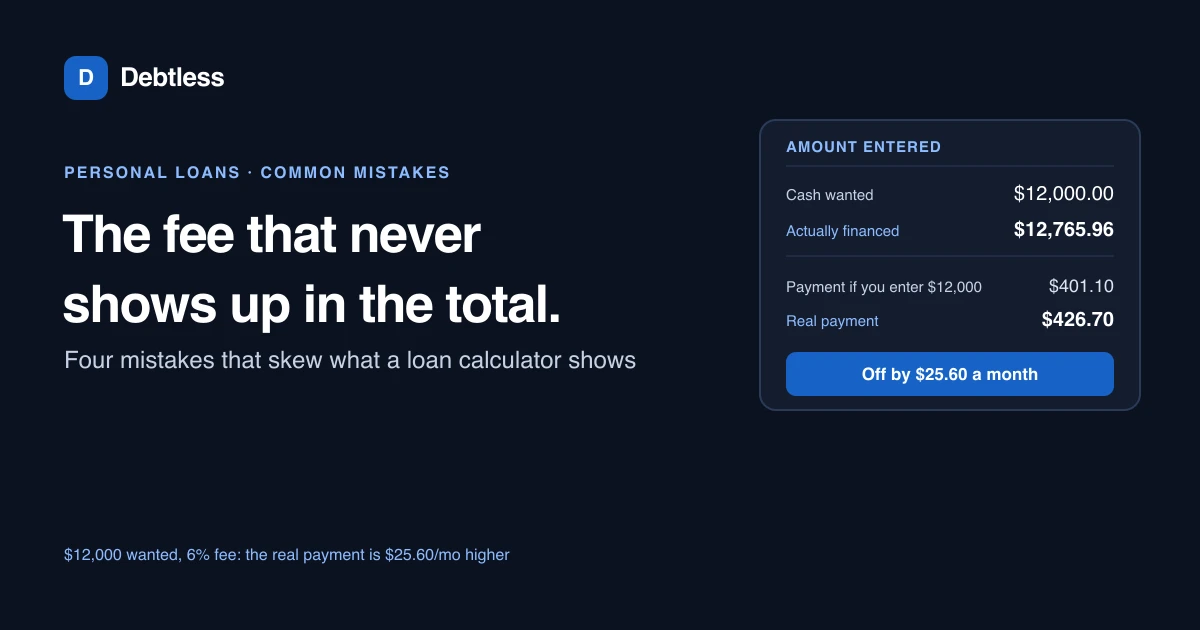
The short answer
A bank loan payment calculator estimates your monthly payment from three numbers: the amount you're borrowing, the APR and the term in months, the same inputs behind any amortizing loan. The most common mistake is entering the amount you want to walk away with instead of the amount financed, since an origination fee gets deducted from the loan before it reaches your account but still accrues interest on the full amount borrowed. On a $12,000 personal loan at 12.44%, the average Bankrate reported for a 700 FICO score in September 2026, that one mix-up can understate the real payment by more than $25 a month.
Mistake 1: entering the amount you want instead of the amount financed
Most personal loans deduct an origination fee straight from the proceeds before the money reaches your account. According to the Consumer Financial Protection Bureau, personal installment loans commonly carry fees like this, and the loan you sign for is sized to cover both the cash you receive and the fee itself.
Say you want $12,000 in hand and the lender charges a 6% origination fee. The actual amount financed is $12,765.96, not $12,000, since the fee comes out of the loan before you see any of it. Enter the $12,000 you wanted into a calculator instead of the true $12,765.96 financed, and at 12.44% over 36 months it returns a payment of $401.10, when the real payment on the loan you signed is $426.70. The gap, $25.60 a month, comes entirely from a principal figure that was never the actual balance.
Mistake 2: treating the annual rate as a monthly one
An APR is an annual figure by definition, and a calculator that isn't dividing it by 12 internally needs you to enter the annual number, not a monthly one you calculated yourself. Mixing this up in either direction produces a payment that's off by an order of magnitude, not a rounding error you'd miss.
On the same $12,000 loan at 12.44% over 36 months, treating that 12.44% as a monthly rate rather than an annual one pushes the calculated payment to $1,515.05, nearly four times the real $401.10. A payment that far off from what you expected is usually the first sign something in the setup is wrong.
Mistake 3: entering the term in years where the calculator wants months
Loan applications and calculators don't agree on units. Some ask for the term in years, some in months, and typing "3" into a field built for months turns a 36-month loan into a 3-month one, with a payment large enough to be obviously wrong the moment it appears.
This is closer to a typo than a genuine misunderstanding, but it's common enough to check every time: read the label on the field, not just the number you already have in your head.
Mistake 4: assuming a quoted rate is locked in
According to the CFPB, a fixed APR stays the same for the life of the loan while a variable APR can change with a benchmark index, and the two produce very different long-run totals even when the starting rate looks similar. A calculator run once with a promotional or introductory rate won't reflect what you'll actually pay once that rate resets.
The same amount-financed mix-up shows up on a car loan in a different disguise; Car Payment Calculator: A Worked Example With Real Numbers walks through how the number financed differs from the sticker price. And a personal loan can sometimes be split into a biweekly repayment schedule the way Mortgage Payoff Calculator: A Biweekly Payment How-To describes for a mortgage, though few banks offer it without you asking first.
$12,000 wanted in hand, 12.44% APR, 36 months
| Correct: $12,765.96 financed | Mistake: $12,000 entered | |
|---|---|---|
| Monthly payment | $426.70 | $401.10 |
| Total interest | $2,595.25 | $2,439.54 |
| Gap from the real payment | $0.00 | $25.60 a month understated |
Calculated with the standard amortization formula on a hypothetical $12,000 net loan with a 6% origination fee deducted at closing. Rate reflects Bankrate's Personal Loan Rates survey for a 700 FICO score, $5,000 loan amount and 3-year term, as of September 16, 2026, applied here to a larger hypothetical balance.
Worked example · illustrative numbers
Example: a rate typed in the wrong place
On the same $12,000 loan at a true 12.44% APR over 36 months, the correct payment is $401.10. Enter that 12.44% as though it were already a monthly rate, a mistake that's easy to make if a spreadsheet or a different calculator elsewhere expected a monthly figure, and the result jumps to $1,515.05.
The formula stayed the same in both runs. What changed is what that 12.44% figure was standing in for: an annual rate spread across 12 months, or a monthly rate on its own. Reading the label next to the input field before you type in a number catches this every time.
Put this into practice with Debtless
Debtless's calculator takes the amount financed, the APR and the term directly, so an origination fee needs to be added into the principal by hand before you enter it, the same check this article walks through. Once a personal loan is entered correctly, it shows a payoff date next to every other debt in the free iPhone app, so a bank loan payment isn't the only number competing for your budget.

Common questions
What's the most common bank loan payment calculator mistake?
Entering the amount of cash you want to receive instead of the amount actually financed. Any origination fee gets rolled into the loan and accrues interest, so the true principal is higher than the cash you see land in your account.
Why did my calculator show a payment nearly four times higher than expected?
Check whether you entered an annual APR as if it were a monthly rate. A calculator expecting an annual figure and receiving a monthly one produces a payment far outside a normal range, usually the fastest sign something was entered wrong.
Does every personal loan charge an origination fee?
No, but many do. Check your loan disclosure for the exact fee percentage before entering a principal into any calculator, since the fee changes the true amount financed.
Will a bank loan payment calculator account for a rate that changes later?
Not on its own. A calculator run once with today's rate assumes that rate holds for the full term. If your loan has a variable APR, rerun the calculator whenever the rate resets to see the new payment.
Sources & further reading
- CFPB: Do personal installment loans have fees?
- CFPB: Fixed APR vs. variable APR
- Bankrate: Average Personal Loan Interest Rates
General education for U.S. readers, not individualized financial, legal or tax advice. Examples are hypothetical; lender terms and actual interest calculations can differ. Check your current statements and agreements.
Published by Debtless with AI-assisted drafting. How this journal is made · Suggest a correction