Debtless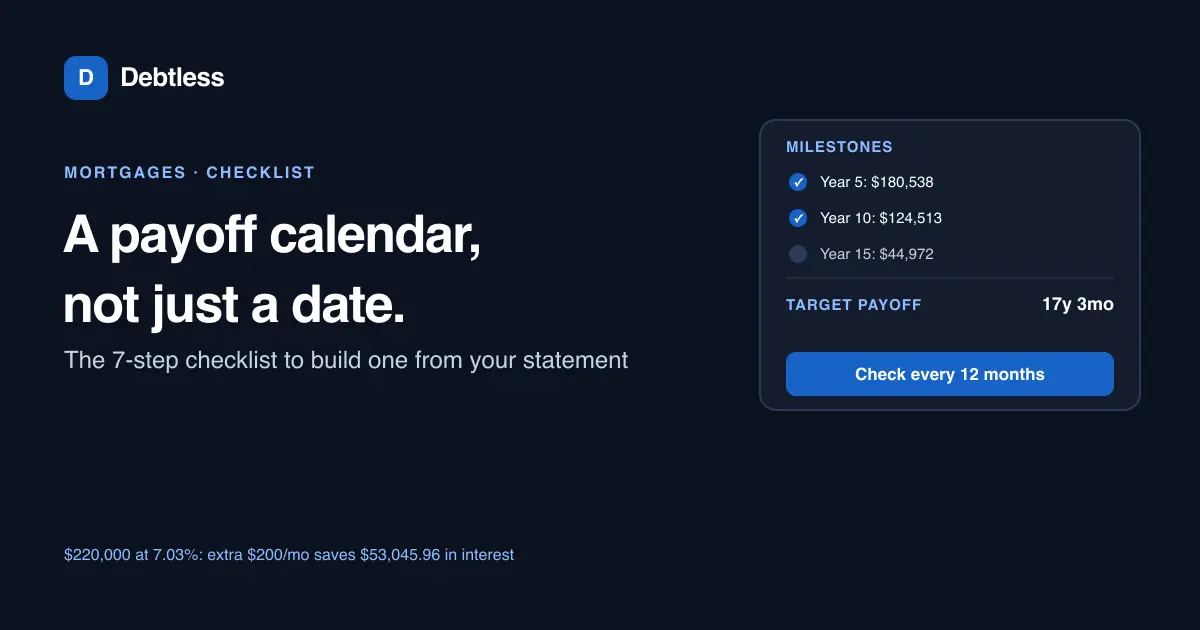
The short answer
A mortgage payoff calendar is a month-by-month schedule that turns your loan's payoff date into milestones you can check against your real statement, instead of just a single number from a calculator. Build one from your current balance, rate, remaining term and extra payment, then mark what your balance should be every twelve months. On a $220,000 balance at 7.03% with 22 years left, an extra $200 a month moves the payoff date to about 17 years and 3 months and saves roughly $53,045.96 in interest.
A calendar is not the same tool as a calculator
A mortgage payoff calculator answers one question: given your balance, rate, remaining term and any extra payment, when does this loan reach zero. It hands you a single date and a total-interest figure.
A payoff calendar takes that date and breaks it into checkpoints you can actually use month to month. Instead of waiting years to find out whether the plan worked, you check your balance every twelve months against a number you wrote down in advance.
It's also a different tool than the payment calendar your servicer might email you, which just lists due dates for the payment you already owe. A payoff calendar is something you build yourself, on top of that, to track progress toward paying the loan off early.
The 7-step checklist
Building a payoff calendar takes about twenty minutes once you have a recent statement in hand.
- Pull your current balance, interest rate and remaining term from your most recent statement, not from the paperwork you signed when you closed the loan.
- Pick one extra-payment amount you can sustain every month, and run it through a payoff calculator to get a new payoff date and total-interest figure.
- Call or message your servicer to confirm extra payments post to principal immediately, since some hold extra amounts in a suspense account until they add up to a full payment.
- Divide the time between now and the new payoff date into twelve-month blocks, and write down what your balance should be at the end of each block.
- Mark likely lump-sum windows on the same calendar, a tax refund, a work bonus, a holiday check, so you decide in advance whether to apply them to principal.
- Revisit the whole calendar once a year, since a rate reset or a PMI cancellation can change what your extra payment is actually buying toward the balance.
- At the end of each twelve-month block, compare your real balance to the milestone you wrote down, and adjust next year's extra-payment amount if your budget changed.
Milestones for a $220,000 balance at 7.03%
Freddie Mac's Primary Mortgage Market Survey put the 30-year fixed rate at 7.03% for the week of September 24, 2026. Take a $220,000 balance at that rate with 264 months, 22 years, remaining. The required payment is $1,639.60 a month, and paying only that amount costs $212,854.28 in total interest over the full term.
What changes the calendar mid-course
Private mortgage insurance is one of the more common mid-course changes. According to Experian, a lender is required to cancel PMI automatically once a loan reaches 78% of the home's original value, or at the loan's midpoint, whichever comes first, and you can request cancellation yourself once you reach 80%. Either event frees up money that can go straight into your extra-payment line instead of disappearing into the calendar as-is.
An adjustable rate resetting works the other way. If your rate rises at the next reset, the same extra-payment dollar amount buys less progress than your calendar assumed, so the milestone check at that year's mark is the moment to decide whether to raise the extra payment or accept a later date. The cash flow payoff method is worth reading if a rate reset, or any other change, means you need to find new room in the budget rather than just accept a slower calendar.
$220,000 balance, 7.03% APR, 22 years remaining
| Milestone | Required payment only | With extra $200/month |
|---|---|---|
| Balance at year 5 | $194,868.12 | $180,538.42 |
| Balance at year 10 | $159,187.36 | $124,513.19 |
| Balance at year 15 | $108,529.93 | $44,971.88 |
| Payoff | 22 years | About 17 years, 3 months |
Calculated with the standard amortization formula. Rate reflects Freddie Mac's Primary Mortgage Market Survey average for the week of September 24, 2026.
Worked example · illustrative numbers
Example: reading the calendar at year 5
Five years into the $220,000 example above, the required-payment-only path has a balance of $194,868.12. The extra-$200 path has a balance of $180,538.42, a difference of $14,329.70 for sixty months of the same extra payment.
That's what a payoff calendar is for: not a distant date seventeen years away, but a checkable figure at year 5 that tells you whether the plan is actually working, or whether it's time to revisit the extra-payment amount.
Put this into practice with Debtless
Debtless doesn't build the calendar for you or send milestone reminders, since it doesn't hold a to-do list. What it does is recalculate your mortgage's payoff date the moment you change the balance, rate or extra payment, so building the twelve-month milestones from that number takes a few minutes, right alongside every other debt the free iPhone app is tracking for you.

Common questions
What's the difference between a mortgage payoff calendar and a mortgage payoff calculator?
A calculator gives you one output: a new payoff date and a total-interest figure based on your balance, rate, term and extra payment. A calendar takes that output and breaks it into milestones you check against your real balance every year, so you find out the plan is off track long before the payoff date arrives.
How often should I update a mortgage payoff calendar?
At least once a year, and any time your extra-payment amount, your rate, or your PMI status changes. Recalculating the payoff date after any of those changes is the easiest way to refresh the milestones.
Do I need special software to build a payoff calendar?
No. A simple table with a year and a target balance works, built from a calculator's output. The calculator does the math; the calendar is just where you write down the checkpoints.
What should I do if my real balance is behind the milestone I set?
Check whether your extra payments have actually been posting to principal, since a servicer error is a common cause. If the payments are posting correctly, [a debt payoff plan built from your statements](/guides/how-to-make-a-debt-payoff-plan/) can help you find room to raise the extra amount for the next twelve-month block.
Sources & further reading
General education for U.S. readers, not individualized financial, legal or tax advice. Examples are hypothetical; lender terms and actual interest calculations can differ. Check your current statements and agreements.
Published by Debtless with AI-assisted drafting. How this journal is made · Suggest a correction