Debtless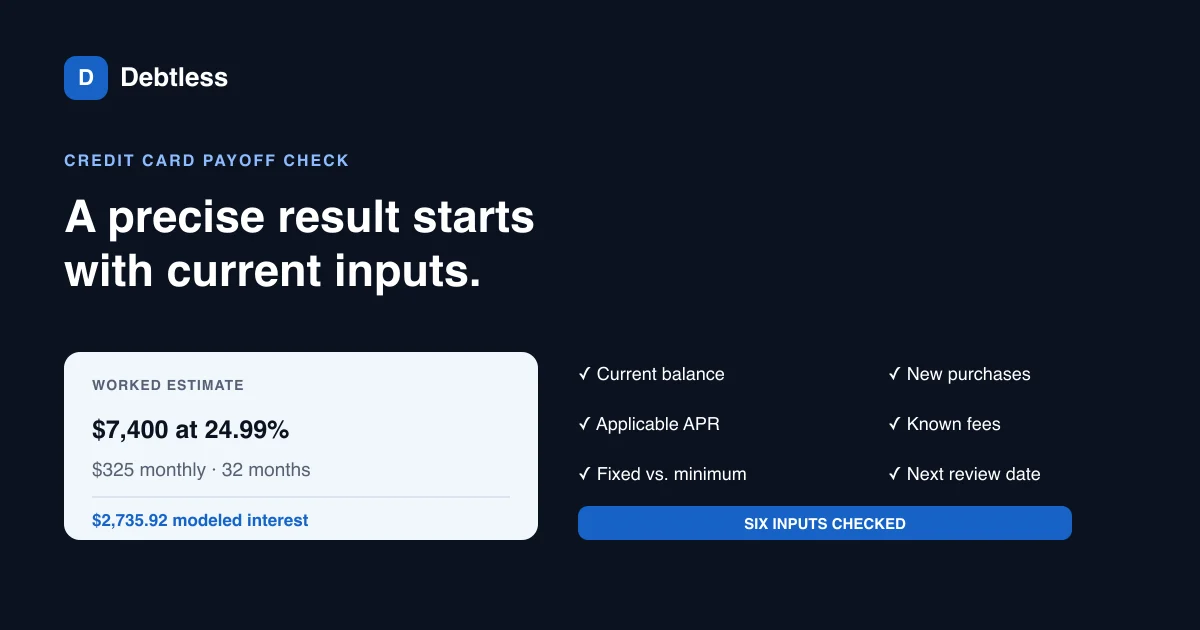
The short answer
A credit card payoff calculator needs the current balance, applicable APR, and a payment larger than the interest accruing each month. The most common mistakes are entering an old balance, treating a shrinking minimum as a fixed payment, ignoring new purchases or fees, and assuming the APR will never change. With a $7,400 balance at 24.99%, a fixed $325 payment takes 32 modeled months and about $2,735.92 in interest.
Which balance should a credit card payoff calculator use?
A credit card payoff calculator should use the balance that matches the plan's starting date. The statement balance is a stable snapshot for a statement-based plan. The current balance may be newer, but it can include purchases, credits, or pending activity that the statement did not contain. Label the date and avoid combining one balance with interest from another period.
Mistake 1 is entering the credit limit, the original transfer amount, or last month's remembered balance. Mistake 2 is overlooking a second balance category on the same card. Purchases, balance transfers, and cash advances can carry different APRs, so one blended entry can hide the expensive portion.
The average daily balance explainer shows why timing matters: an issuer may add each day's balance and divide by the number of days in the billing cycle before applying a periodic rate. A calculator that uses one monthly snapshot remains an estimate. Your statement and cardholder agreement control the account.
Why can the minimum-payment setting distort the payoff date?
The minimum-payment setting can distort the payoff date when the calculator treats today's minimum as a fixed payment forever, or treats a planned fixed payment as a minimum that shrinks. Those are different paths. A fixed $325 keeps sending the same amount as the balance falls. A percentage-based minimum usually declines and can extend the tail of repayment.
According to the Consumer Financial Protection Bureau, card statements must show how long the current balance would take to repay with no new charges and minimum payments, along with the monthly amount that would repay that balance in 36 months. The CFPB also says future purchases are excluded from those disclosures. That statement box offers a useful cross-check for a calculator using the same balance date.
Mistake 3 is copying the displayed minimum into a fixed-payment field without reading the label. If your goal is a stable $325 payment, enter $325 as the payment you plan to keep making. If you want to model minimums, use the issuer's formula and floor from the agreement. The article on how card minimum payments are calculated explains why a single generic percentage cannot represent every card.
How do new purchases and fees change a payoff estimate?
New purchases and fees change a payoff estimate by adding principal that the original schedule never planned to repay. Mistake 4 is entering zero for future spending while continuing to use the card for recurring bills. A $325 payment paired with $100 of new monthly charges behaves more like a $225 reduction budget before interest, and the projected date moves.
Mistake 5 is leaving out annual fees, late fees, or a balance-transfer fee that has already posted. Do not invent future charges, but include known amounts in the starting balance or in a dated adjustment if the tool supports one. Check whether a promotional transfer fee became part of the interest-bearing balance.
Run a clean scenario and a realistic scenario. The clean version assumes no new charges and shows what the existing balance could do. The realistic version includes recurring spending you expect to continue. The gap between them is more useful than a single optimistic date because it identifies the behavior the plan depends on.
| Input check | Misleading entry | Better entry |
|---|---|---|
| Starting balance | Remembered $7,000 | Dated statement balance: $7,400 |
| APR | Intro offer from an ad | Current 24.99% purchase APR |
| Payment | Today's $225 minimum as fixed | Planned fixed payment: $325 |
| New spending | $0 while card stays in use | Expected recurring charges or a no-use assumption |
| Fees | Ignored | Known posted fees included |
| Review date | Never | After each statement or rate change |
Use figures from the same statement cycle. A precise calculator cannot repair inconsistent inputs.
When should you rerun a credit card payoff calculator?
A credit card payoff calculator should be rerun after a rate change, a large purchase, a missed or different payment, a fee, or a balance update that materially changes the plan. Mistake 6 is treating the first result as a promise. The result is a forecast tied to assumptions that can expire with the next statement.
Variable APRs can move when the underlying index changes. Promotional APRs also have end dates. Entering 0% for a schedule that extends beyond the promotion understates later interest unless the tool supports a dated rate change. The lower-APR worked example shows how the same balance and payment respond when the APR changes.
Use the first estimate as a baseline, then compare actual statement balances. If the model expected $6,900 and the statement closes at $7,050, investigate the $150 gap before celebrating or abandoning the plan. It might be new spending, accrued interest, a fee, a returned payment, or a timing difference. Each cause calls for a different correction.
- Save the balance date, APR, and payment used in the estimate.
- Make the planned payment by the issuer's due date.
- Record new charges, credits, fees, and any APR change.
- Compare the next statement balance with the modeled balance.
- Rerun the calculator from the new verified balance when the assumptions changed.
Worked example · illustrative numbers
How much does the payment change a $7,400 card payoff?
| Fixed monthly payment | Modeled payoff time | Modeled interest | Modeled total paid |
|---|---|---|---|
| $225 | 57 months | $5,207.47 | $12,607.47 |
| $325 | 32 months | $2,735.92 | $10,135.92 |
| $425 | 22 months | $1,886.91 | $9,286.91 |
Hypothetical fixed-rate monthly model at 24.99% APR, with no new charges or fees and a smaller final payment. Issuer calculations and daily timing can differ.
Put this into practice with Debtless
Debtless can compare the $225, $325, and $425 plans after you enter the current balance, APR, and required minimum. The payoff calculator also lets you place this card beside other debts, while your issuer's statement remains the source for the amount due and the account's interest terms.

Common questions
Will a credit card payoff calculator match my statement exactly?
Usually not to the cent. Issuers may use daily balances, specific posting times, different cycle lengths, fees, and rounding rules. Use the calculator for planning and the statement for the official account record.
Should I calculate with the minimum or a fixed payment?
Use a fixed payment when you intend to keep paying that dollar amount. Use a minimum-payment formula only when you want to model the issuer's changing required payment and you know the formula and floor.
Does the payoff date assume I stop using the card?
Most simple payoff dates assume no new purchases, cash advances, or fees. If you expect new activity, include it in a tool that supports future charges or treat the no-charge result as a best-case baseline.
What if my planned payment does not cover monthly interest?
The balance will not decline under that assumption. Confirm the APR and payment, then contact the issuer promptly if you cannot make the required payment rather than relying on a payoff estimate.
Sources & further reading
- CFPB: Understanding the three-year repayment box on a card statement
- CFPB: How credit card interest is calculated
- CFPB: Fixed APR vs. variable APR
General education for U.S. readers, not individualized financial, legal or tax advice. Examples are hypothetical; lender terms and actual interest calculations can differ. Check your current statements and agreements.
Published by Debtless with AI-assisted drafting. How this journal is made · Suggest a correction