Debtless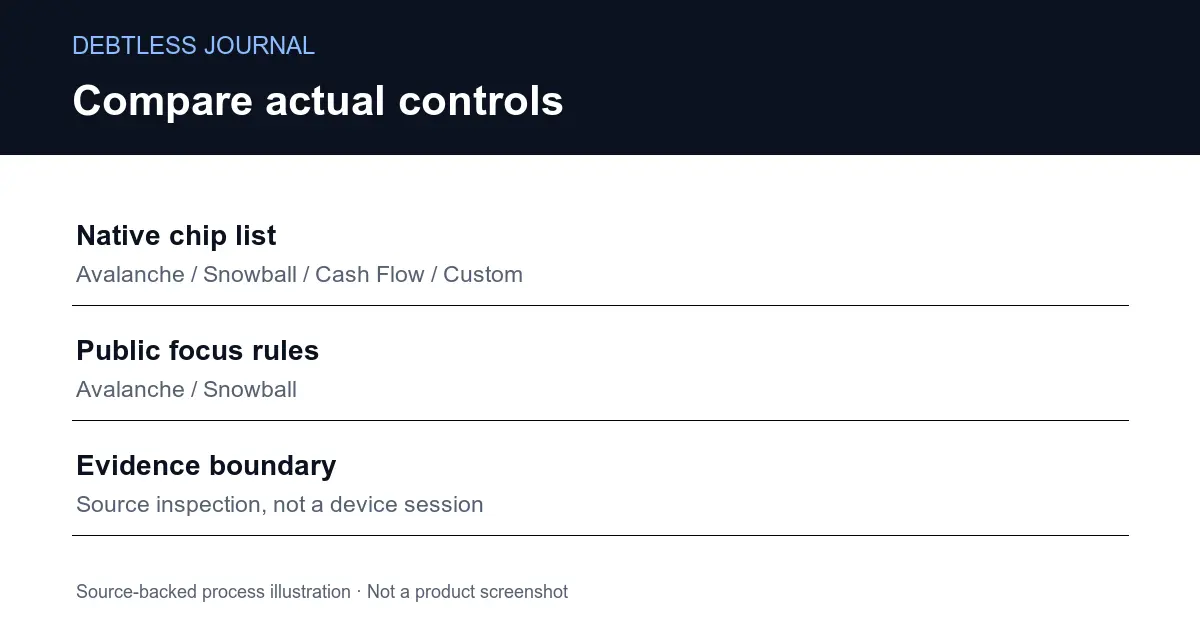
Which strategy choices are actually visible in native source?
The native source explicitly lists the strategies intended for chips on the Plan tab and in the Settings picker. For an interface claim, that list matters more than the full enum. An enum can contain a mode used internally, retained for compatibility or called from another calculation without giving the person using the app a separate button for it.
The visible list in the tracked PayoffCalculator.swift file includes Avalanche, Snowball, Cash Flow and Custom. Nearby comments explain that Hybrid and the interest-savings optimizer remain in the type and automatic calculations but are not surfaced as their own chip. This is a source-backed description of the interface contract. It is not a new device test or evidence that a particular installed build already matches this repository.
When evaluating another app, ask the same concrete question: can you select the claimed strategy in the version you will use? A feature description that says “multiple algorithms” leaves that unanswered. The iPhone payoff-app selection guide covers broader selection criteria; this comparison stays with the controls that can change a planning session.
How do the public calculator choices differ?
The public calculator defines two focus-order functions. Avalanche sorts by descending APR, with balance used to resolve a tie. Snowball sorts by ascending balance, with APR used to resolve a tie. Those expressions tell you what the public model does when it chooses a debt for extra money. They do not show the Cash Flow or Custom strategies as additional public focus-order functions.
A web page can still be useful with fewer controls. If your immediate question is the difference between the two common order rules, a small public calculator may answer it without creating an app record. If you need a manually chosen order, do not assume the web page acquired that control merely because the native source contains it.
The CFPB describes highest-interest and snowball approaches as two basic debt reduction strategies. That supports comparing the two rules as recognizable planning approaches; it does not certify either implementation. Use the public Debtless calculator when its available controls match the question you want to explore. Keep the result tied to the exact inputs and mode you selected.
Why should a comparison separate controls from calculations?
A comparison should separate controls from calculations because an available button and a reliable estimate are different claims. Source can establish that a named strategy is listed for the interface. It takes further checks to establish how that strategy allocates payments, handles invalid inputs and reports a result. A screenshot of a chip would still not establish all of that math.
Keep a comparison row for each kind of evidence. One row can identify the exposed choice. Another can describe a tested calculation. A third can state what remains unverified, such as behavior on your device or your own creditor’s interest method. This prevents a broad feature label from carrying more weight than the inspection actually supports.
This article does not compare subscription prices, customer ratings or rival products. It compares two implementations in the existing Debtless repository. That narrower scope makes the differences inspectable and avoids inventing competitor limitations. If the interface changes later, recheck the strategy list and the actual page before treating this table as a current selection guide.
Which surface fits the planning question you have today?
Choose the surface whose available choices match your current planning question. The public web calculator fits a contained avalanche-versus-snowball scenario. The native source exposes additional named planning choices and a Custom option. Decide what comparison you need before entering financial figures, then verify the chosen interface in the installed version or live page.
A planning session also needs a stable comparison boundary. Change one thing at a time: the chosen rule, the recurring extra or the starting snapshot. If all three change together, a different date will not tell you what caused the difference. Save the inputs and the selected mode beside the output so you can repeat the comparison later.
Use the article on payoff apps and budgeting apps when the real problem is finding room for payments across the whole household budget. A strategy selector cannot answer whether that budget fits. Once the budget is settled, the payoff controls can help you examine allocation choices without confusing the forecast with a payment instruction.
After choosing a surface, check one actual session for labels you understand, a clear input summary and a result status you can explain. If a claimed choice is absent in the version you have, document that gap instead of guessing which hidden algorithm it used. Keep the question specific enough to repeat in the tool you choose.
What evidence belongs beside each action?
| Question | Tracked native contract | Public web engine |
|---|---|---|
| Common focus rules | Avalanche and Snowball chips | Avalanche and Snowball sort functions |
| Additional named choices | Cash Flow and Custom chips | No corresponding focus functions in calc.js |
| Evidence boundary | Source list, not device session | Existing public engine source, not creditor terms |
Same-product implementation comparison. No independent ranking or promise of identical outputs across versions.
Worked example · source walkthrough
What is the native visible-chip contract?
The tracked file debtlist/PayoffCalculator.swift contains this exact strategy-list line: .avalanche, .snowball, .cashflowOptimizer, .custom
That line belongs to static let chips, the list documented for Plan and Settings controls. The nearby automatic list has additional strategies. Counting the enum cases as exposed controls would therefore exaggerate what this source says. This walkthrough proves a source distinction; it does not claim a new native runtime capture or a particular App Store release.
Put this into practice with Debtless
Check the controls in the Debtless version you actually use. The source distinguishes native strategy chips from the smaller public focus-order model. Neither a forecast nor a strategy selection sends money to a creditor. Make the real payment through an authorized channel, then update the plan from the posted result.

Common questions
Does the Debtless web calculator expose every native strategy?
The tracked public engine defines avalanche and snowball focus functions. The native chips list also includes Cash Flow and Custom. Do not assume every native choice appears on the public page.
Does an algorithm enum prove there is a visible button?
No. The native source distinguishes its full strategy enum, automatic list and visible chips list. Use the chips contract and the actual installed interface for a claim about selectable controls.
Is this an independent ranking of debt payoff apps?
No. It is a source-backed comparison of two Debtless surfaces. It does not establish competitor prices or features, native runtime behavior, or which strategy suits an individual borrower.
Sources & further reading
General education for U.S. readers, not individualized financial, legal or tax advice. Examples are hypothetical; lender terms and actual interest calculations can differ. Check your current statements and agreements.
Published by Debtless with AI-assisted drafting. How this journal is made · Suggest a correction